
AI on your terms: Firefox meets you where you are
People feel differently about AI, and here at Firefox, we think that is completely reasonable. Something else that is completely reasonable: deciding for yourself how and when you engage with AI features.
For some of you, AI is part of your everyday life, whether you are using it to summarize a large amount of information, brainstorm ideas for work, or research trips and personal purchases. Some of you interact with AI as little as possible, and prefer to keep it that way. And a lot of you are somewhere in between: curious, but exploring on your own terms and at your own pace.
Your personal use of AI is just that, personal. Firefox offers various levels of AI integration into your browser, and the choice between them is entirely yours.
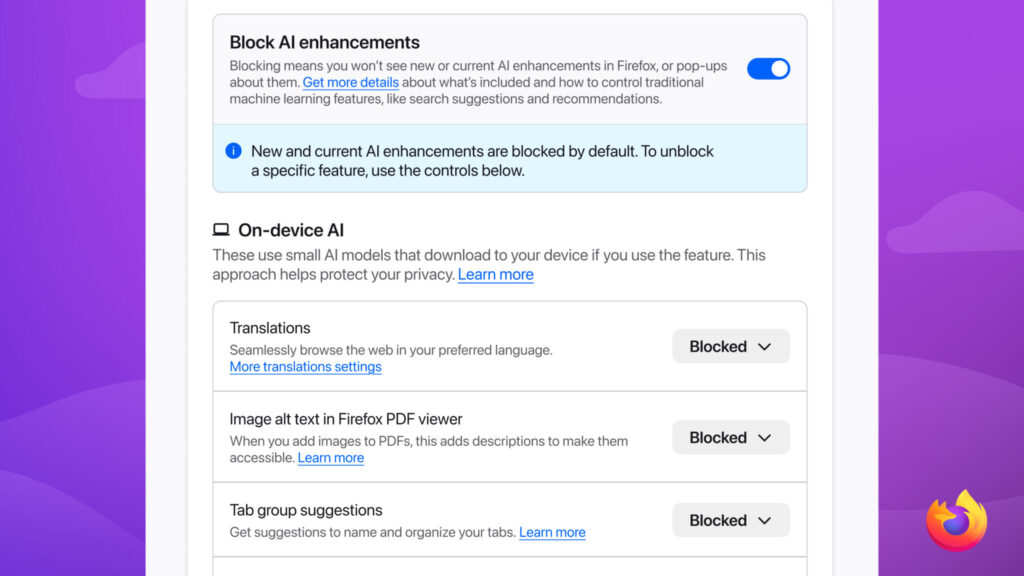
Opting out of upcoming and current AI features on your browser should not require endless navigation through multiple Settings pages. That’s why Firefox offers an AI controls section within its General Settings panel. A single, easily located place where you can block current and future AI features and related pop-ups with the swipe of a toggle.
Not only do we want people to have the choice to remove certain AI features from their Firefox browsing experience, we make sure doing so is as easy and accessible as possible.
For the many people who sit in the middle of the AI usage spectrum, we made sure you can opt in and out of specific features in line with your preferences. Capabilities like AI translations, image alt text in Firefox PDF viewer, tab group suggestions, and key points in link previews can all be individually switched on and off, ensuring you can enjoy such offerings on a case by case basis as it suits your needs.
In addition, if there is an AI chatbot provider you already trust or pay for, you can use it directly inside Firefox’s built-in desktop sidebar. This means you can use your chatbot of choice and browse side by side without ping-ponging between tabs.
While some browsers integrate a singular AI model or chatbot into their system, this can restrict flexibility and concentrate data sharing. Firefox prioritizes transparency and user control by letting you select from multiple providers, allowing you to review each option’s policies before you engage with them.
You can turn on AI chatbot providers in the AI controls section of browser settings and select one of the following: Anthropic Claude, ChatGPT, Google Gemini, and Le Chat Mistral. Once this feature is turned on, you can switch between chatbots within the sidebar itself based on your preferences and task at hand.
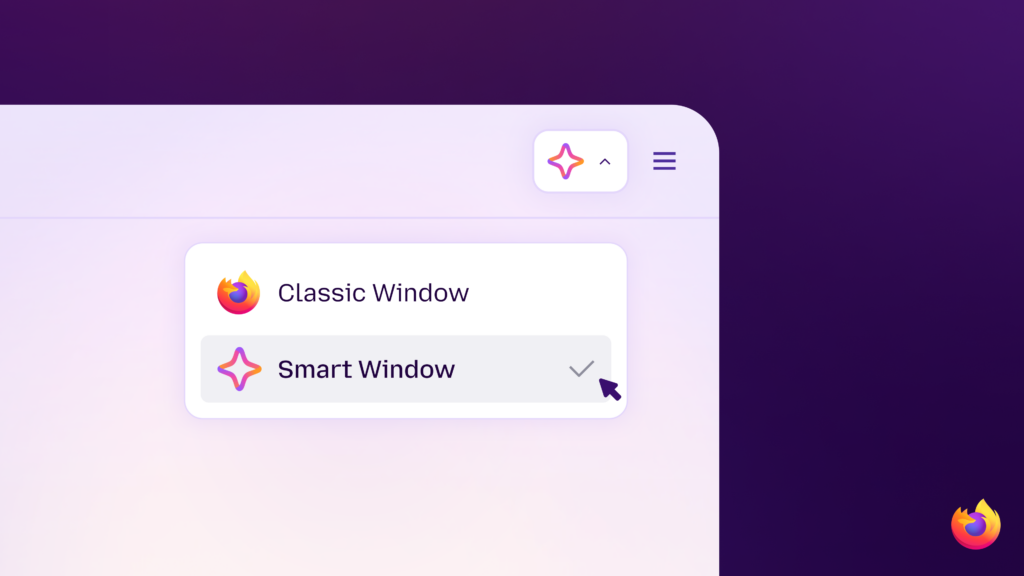
Smart Window is Firefox’s most integrated AI experience, but that doesn’t mean it compromises our commitment to choice, privacy, and transparency. Our newest window type, which we’ve been polishing and testing in beta, uses only the context you share with it to help you move work forward and across the finish line.
When permitted by you, its built-in, AI-powered assistant can work directly with your open tabs and browsing history to connect the dots. This means comparing information, generating recommendations, summarizing pages, and planning projects without having to feed every crumb of context from your previous and current browsing activity each time you enter a new prompt.
As we’ve built out Smart Window, we’ve added a few additional features to align its design with how people actually browse. These include the ability to group related tabs together – so you can make sense of what’s open without spending time organizing everything yourself – and visual history previews that help you spot a page you visited earlier when you can’t remember the exact URL or phrase searched. In addition, a new partnership with Exa enables Smart Window to not only locate current web information to include in responses, but also display the sources behind these responses so you can verify what you’re seeing, without breaking your flow.
We understand people use different Firefox windows for different reasons, and often switch between options based on the task at hand. Smart Window is the window you reach for when your browsing turns into a project. When your quick search becomes inspo for the girls’ trip you’ve been meaning to plan, or finding the perfect gift for your partner becomes a dozen tabs comparing prices and reviews, turn the window you’re already using into a Smart Window. Your tabs and progress stay in place while Smart Window helps organize the task and move it forward. Use it for one complex project, use it all the time, or switch it back when you’re done.
Smart Window remains in beta as we continue to learn and improve from our community’s feedback. At present, it’s available in English to people in the U.S. and Canada.
To try Smart Window, visit: https://www.firefox.com/smart-window
Your opinions and preferences on AI usage are individual to you.
We don’t think there is one right answer for how and when to engage with AI, and we’re not going to pretend there is one. What we can do is make sure that whatever level of engagement is right for you, Firefox supports it well. Because the only person telling you how much AI you need should be you.
The post AI on your terms: Firefox meets you where you are appeared first on The Mozilla Blog.
Firefox onthult ingebouwde adblocker voor iOS – update - ictmagazine.nl
Firefox voor iOS krijgt ingebouwde adblocker die standaard uit staat - tweakers.net
Introducing Ad Blocker for Firefox on iOS: More Control, Fewer Distractions
There’s only so much room on your screen. Pop-ups, overlays, and ads can take over fast, getting between you and what you came to do.
That’s where Ad Blocker for Firefox on iOS comes in: a built-in option that blocks many third-party ads and ad-related trackers before they load, helping reduce clutter and distractions while you browse.
How it works
Ad Blocker uses Apple’s WebKit Content Blocker technology and the EasyList filter list to determine what gets blocked. There’s no separate extension to install, and you can turn it on in Settings > Browsing > Ad Blocker. It’s off by default, so you decide whether to use it.
Ad Blocker won’t block every ad. Ads served directly by the site you’re visiting and ads shown in search results will still appear. Sponsored shortcuts and other sponsored content shown by Firefox when you open a new tab are separate from ads on the web pages you visit, so Ad Blocker doesn’t affect them.
Ad Blocker works alongside the privacy protections already built into Firefox, including Enhanced Tracking Protection, which blocks many trackers and limits tracking across the web.
More control over how you experience the webOn Desktop and Android, Firefox already supports a strong ecosystem of ad-blocking and privacy extensions, giving people the flexibility to choose the tools that work best for them. We value that ecosystem and will keep supporting it.
iOS works differently. Extensions aren’t available in the same way, and we know people want more options. Bringing ad blocking to Firefox on iOS meant building it directly into the browser.
Giving people choice in how they experience the web is important to us. Advertising helps fund much of the open web, supporting the publishers, creators and websites people rely on. We also know that ads can sometimes crowd the screen or interrupt what you’re trying to do.
That’s why Ad Blocker is optional: you decide whether it’s part of how you browse. It’s part of a broader approach across Firefox to give you more control over your experience, from the extensions you use to how AI shows up in your browser.
Try itTo turn on Ad Blocker, go to Settings > Browsing > Ad Blocker.
If you find an ad you expected to be blocked, a site that behaves strangely or something we should improve, let us know on Mozilla Connect.
Visit our Support page for more details on Ad Blocker for Firefox on iOS. For more on Firefox’s built-in privacy protections, check out How Firefox Protects Your Data.
The post Introducing Ad Blocker for Firefox on iOS: More Control, Fewer Distractions appeared first on The Mozilla Blog.
Firefox Tooling Announcements: Happy BMO Push Day! (20260824.1)
The following changes have been pushed to bugzilla.mozilla.org:
- Bug 1224099 - create 2fa user documentation
- Bug 1832783 - Wrong error message for exceeding file size
- Bug 2064475 - phab-bot leaves #release-managers review as non-blocking when a user manually adds it first
- Bug 2043229 - Display a “Show External” button beneath attachments list to display all attachments that would redirect such as Github and Phabricator
- Bug 2057679 - Update docker build process to pull in latest builds of vendered javascript libraries needed by the client
- Bug 2061264 - Remove CSP header from REST API responses
- Bug 2061831 - Add additional information to bugzilla comments in REST API if comment edited before
- Bug 2061441 - Migrate Classification REST resource to native Mojo API
- Bug 2064523 - [meta] tracking bug for BMO dependency upgrades
- Bug 2053504 - Need to add index to tracking_flags_values table for better performance from /bzapi/bug and REST search
- Bug 2055001 - Github Pull Requests: Look for etag value before fetching pull request data to cut down on rate limiting
Discuss these changes in the BMO Matrix Room
1 post - 1 participant
Hacks.Mozilla.Org: Intent to Ship: JPEG XL
It isn’t often that new image formats land in browsers. In the early 2000s we had JPEG, GIF, and PNG. The 2010s gave us WebP, which was a modest step up from JPEG. But the 2020s have given us two new image formats that are a big step up from previous formats: AVIF and JPEG XL.
We shipped AVIF back in 2021, and today we posted our intent to ship JPEG XL. Chrome are also intending to ship, and given there’s already a partial implementation in Safari, the format will be supported across browsers before the end of the year.
Shipping JPEG XL securelyWe added experimental support for JPEG XL behind a flag back in 2021. But, at 100,000 lines of multithreaded C++, we were concerned about the attack surface this added to Firefox.
So, we laid down a challenge to the JPEG XL team at Google Research: Build a safe, performant, compact, and compatible JPEG XL decoder in Rust, and we’ll ship it. That challenge was met; Google Research built jxl-rs, and it’s the core of our JPEG XL support in Firefox.
We also pushed for high quality integration tests as part of an Interop 2026 investigation area, and they’re coming along nicely.
Progressive renderingAlthough Safari shipped JPEG XL in 2023, their implementation lacked some key features of JPEG XL – our favourite is progressive rendering, which is something we pushed for in the Rust implementation.
Progressive rendering means the image can render as it’s downloading.
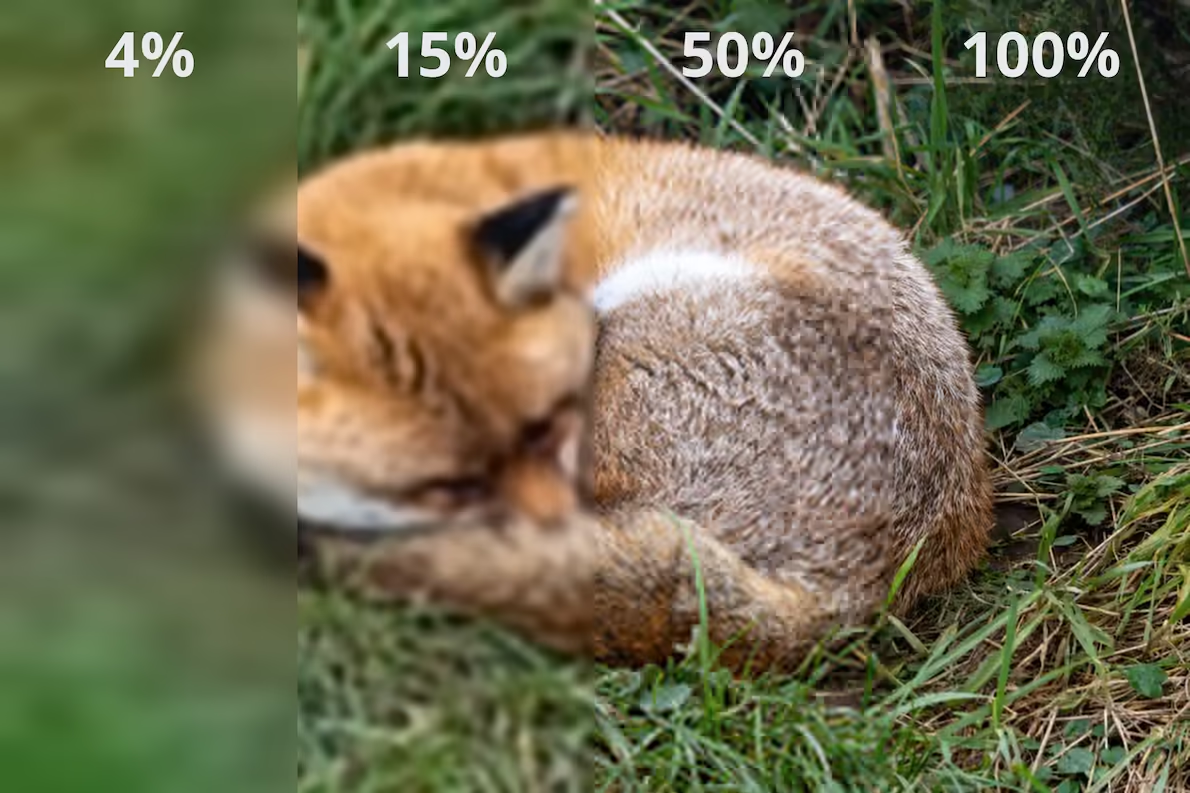
Although the full image is 135 kB, with only a few kB downloaded the user can determine the subject of the image. Try the above demo image in a browser that supports JPEG XL & progressive rendering, like Firefox Nightly – move the slider to see how the image displays with just a portion downloaded.
JPEG XL vs AVIFBrowsers will now have two modern image formats for developers to choose from. Which you choose depends on your use-case.
- JPEG XL: Excels at lossless imagery, progressive rendering, and further compressing JPEGs without quality loss.
- AVIF: Excels at web-quality photographic images, and images that have a mix of sharp edges and flat surfaces.
For example:

The image above is a 116 kB AVIF with a quality score (SSIMULACRA 2) of 62.8, meaning medium-high quality. To get the same quality, the JPEG XL image would be 134 kB.
At a SSIMULACRA 2 score of 80 (very high quality), the AVIF is 227 kB, and the JPEG XL is 264 kB.
But at lossless, the AVIF is 1.76 MB, and the JPEG XL is 1.45 MB. A lossless WebP is 1.55 MB.
Another example is a screenshot of the Interop 2025 scores:
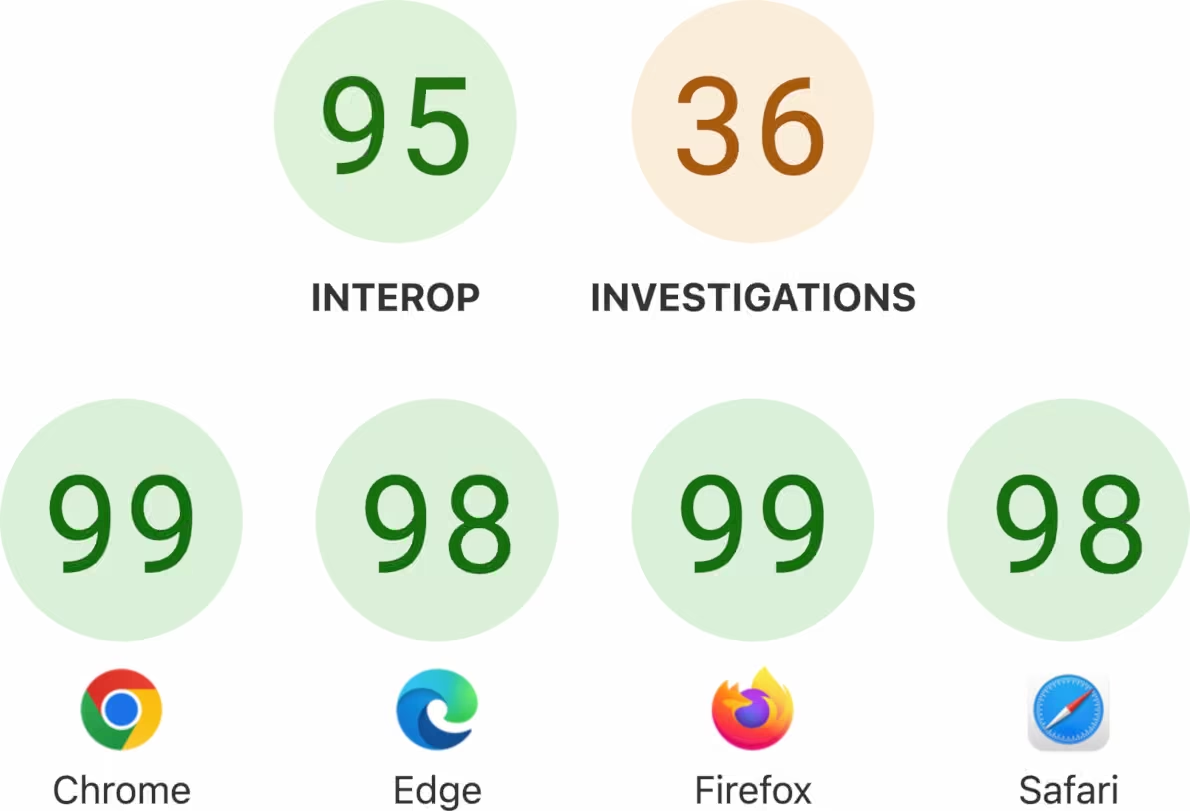
At a SSIMULACRA 2 score of 78 (very high quality), the AVIF is 11.6 kB, and the JPEG XL is 23.8 kB.
But at lossless, the AVIF is 164 kB, and the JPEG XL is 92 kB. A lossless WebP is 96 kB.
Although AVIF tends to produce smaller files at web-quality than JPEG XL, AVIF only has basic progressive rendering support. So, for very large images, it may be worth taking the filesize hit with JPEG XL.
The key is to test with a representative set of images for your site, at a quality that works best for your users, and remember to optimise for high density.
The post Intent to Ship: JPEG XL appeared first on Mozilla Hacks - the Web developer blog.
Jonathan Almeida: SSH access to Github over HTTPS
While using guest wifi during travels, I was trying to fetch some changes from a github remote and my git fetch is over SSH which happens over port 22. Most (TCP?) ports are blocked on public or hotel wifi, so with some help1 I learnt that Github serves SSH over 443 too.
A simple ssh config fixes this:
Host github.com HostName ssh.github.com Port 443 1Claude.
William Lachance: Glean Dictionary + DuckDB
While working on Writing the Docs: 2026 Edition, I experimented a bit with updating the Glean Dictionary to incorporate some of the ideas in the essay, in particular those around reference documentation.
As a sort of demonstration that documentation about an application can be treated as a data product in and of itself, I hacked up a quick ETL pipeline to dump the JSON output of the Glean Dictionary into a DuckDB database that can be queried standalone.
Since the Glean Dictionary is just a static Netlify site, the DuckDB database can simply be published alongside as a standard file. This allows you to do fun things from the DuckDB console like:
memory D ATTACH 'https://glean-dictionary-DuckDB.netlify.app/data/glean_dictionary.DuckDB' AS glean_dictionary (READ_ONLY); memory D SELECT type, count(*) AS metrics FROM glean_dictionary.metrics GROUP BY type ORDER BY metrics DESC; ┌─────────────────────────────┬─────────┐ │ type │ metrics │ │ varchar │ int64 │ ├─────────────────────────────┼─────────┤ │ counter │ 20057 │ │ event │ 7256 │ │ string │ 3545 │ │ labeled_counter │ 3275 │ │ timing_distribution │ 2481 │ │ custom_distribution │ 2169 │ │ quantity │ 1406 │ │ boolean │ 1078 │ │ text │ 588 │ │ labeled_timing_distribution │ 569 │ │ datetime │ 404 │ │ memory_distribution │ 389 │ │ object │ 369 │ │ labeled_custom_distribution │ 340 │ │ rate │ 215 │ │ dual_labeled_counter │ 210 │ │ string_list │ 204 │ │ uuid │ 181 │ │ timespan │ 149 │ │ labeled_boolean │ 118 │ │ labeled_string │ 84 │ │ labeled_memory_distribution │ 66 │ │ labeled_quantity │ 42 │ │ url │ 26 │ └─────────────────────────────┴─────────┘ 24 rows 2 columnsFrom there, you could either build an interface like the Glean Dictionary itself (much easier to do from a database than the somewhat harebrained dataclass soup I originally came up with) or any number of other data products or analyses. Here's an example marimo notebook that tracks the metrics added to each product over time:

As you can see, the number of metrics did a big jump in 2024 (I imagine they finally moved Firefox Desktop over to Glean) with slower and steadier growth since.
The Rust Programming Language Blog: Enabling the next-generation trait solver on nightly
After nearly 4 years of active development, the next-generation trait solver is close to stabilization. We are enabling it by default on nightly to surface any remaining issues and plan to stabilize it in the next months. This is the largest single change to the Rust compiler since its initial release. It completely replaces how we prove where-clauses, normalize associated types, and much more. Please try out the latest nightly and open an issue if you encounter any bugs or regressions.
This is an internal component of the compiler. The main benefits of this rework will come in the future. The removal of the old implementation will unblock features such as Type Alias Impl Trait and Return Type Notation, allow us to add new implicit default trait bounds (e.g., Move and Forget), and enable us to fix the remaining type system unsoundnesses.
Even so, this already fixes a huge number of issues. As an underapproximation, we currently know of more than 200 issues on GitHub fixed by this change. This also has a significant impact on compile times; more on that later. When developing on nightly, you may accidentally rely on behavior only supported by the new trait solver.
This is an incredibly big change which results in a non-trivial amount of breakage. Most of these changes are intended improvements to type inference or the removal of undesirable behavior. We are tracking the known issues and breakage in a pinned GitHub issue.
What can I do?Please update to the latest nightly version by using rustup update nightly and use it to test your existing projects and libraries.
Please tell us if you encounter any breakage, compile-time performance regression, or bad diagnostics. We have not yet spent too much time on error messages for the next-generation trait solver, so we would also appreciate you using this nightly for development to find poor diagnostics and other bugs in our error handling.
If you encounter any issue, take a quick look at the pinned GitHub issue to see if the affected crate is already listed, and if not, please open a new issue! To disable the next-generation trait solver on nightly, you can pass -Znext-solver=coherence to rustc, use RUSTFLAGS=-Znext-solver=coherence, or change your project's .cargo/config.toml configuration file:
[build] rustflags = ["-Znext-solver=coherence"] What exactly does this mean?We will go into more detail about the next-generation trait solver, how we got here, and what it changes when fully stabilizing it. This is a quick summary of its main impact.
impl Trait handlingThe way opaque types — return-position impl Trait (RPIT), but also the unstable Type Alias Impl Trait (TAIT) and Return Type Notation (RTN) — are handled in the type system has nearly completely changed. This fixes a lot of bugs and edge cases with them and should make their behavior a lot more consistent in general. This change is why the next-generation trait solver is necessary to stabilize TAIT and RTN.
The implementation change mostly does not matter for RPIT as we special-cased impl Trait from the method signature when type checking the method body. This means the only way to observe the old behavior is via recursive function calls. The following snippet errors with the existing implementation, but compiles with -Znext-solver enabled: godbolt
fn foo(b: bool) -> impl Sized { if b { // The old implementation errored here. foo(false) + 1 } else { 0 } } Associated types in higher-ranked typesThe most impactful change is way we handle associated types referencing bound variables, i.e., lifetimes from a for<'a> binder, for example, the type for<'a> fn(<T as Trait>::Assoc<'a>). While most users don't encounter such types directly, there are widely used crates which do. This change impacts existing code by removing incorrect type inference, such as in bevy and minijinja.
It also fixes a bunch of unnecessary errors like in the following example: godbolt
trait OtherTrait { type Assoc<'a>; } impl OtherTrait for u32 { type Assoc<'a> = &'a u32; } trait Trait {} impl<T: OtherTrait> Trait for (T, for<'a> fn(<T as OtherTrait>::Assoc<'a>)) {} fn impls<T: Trait>() {} fn main() { // The old implementation failed to prove // the where-bound of `impls`. impls::<(u32, for<'a> fn(&'a u32))>(); } Compile-time performanceco-authored with jana :3
We've spent a lot of time on the compile-time performance of the next-generation trait solver. There have been many cases where it performed quadratically or even exponentially slower than the old solver.
Especially the last few weeks were mainly spent on improving performance. This work was shared by many people, with major contributions by Nick Nethercote, jana, Rémy Rakic, and mira.
As part of this effort, Rémy Rakic compared the performance of both implementations for the top 20,000 crates on crates.io. Below you is a visualization of the performance changes over the last two months.
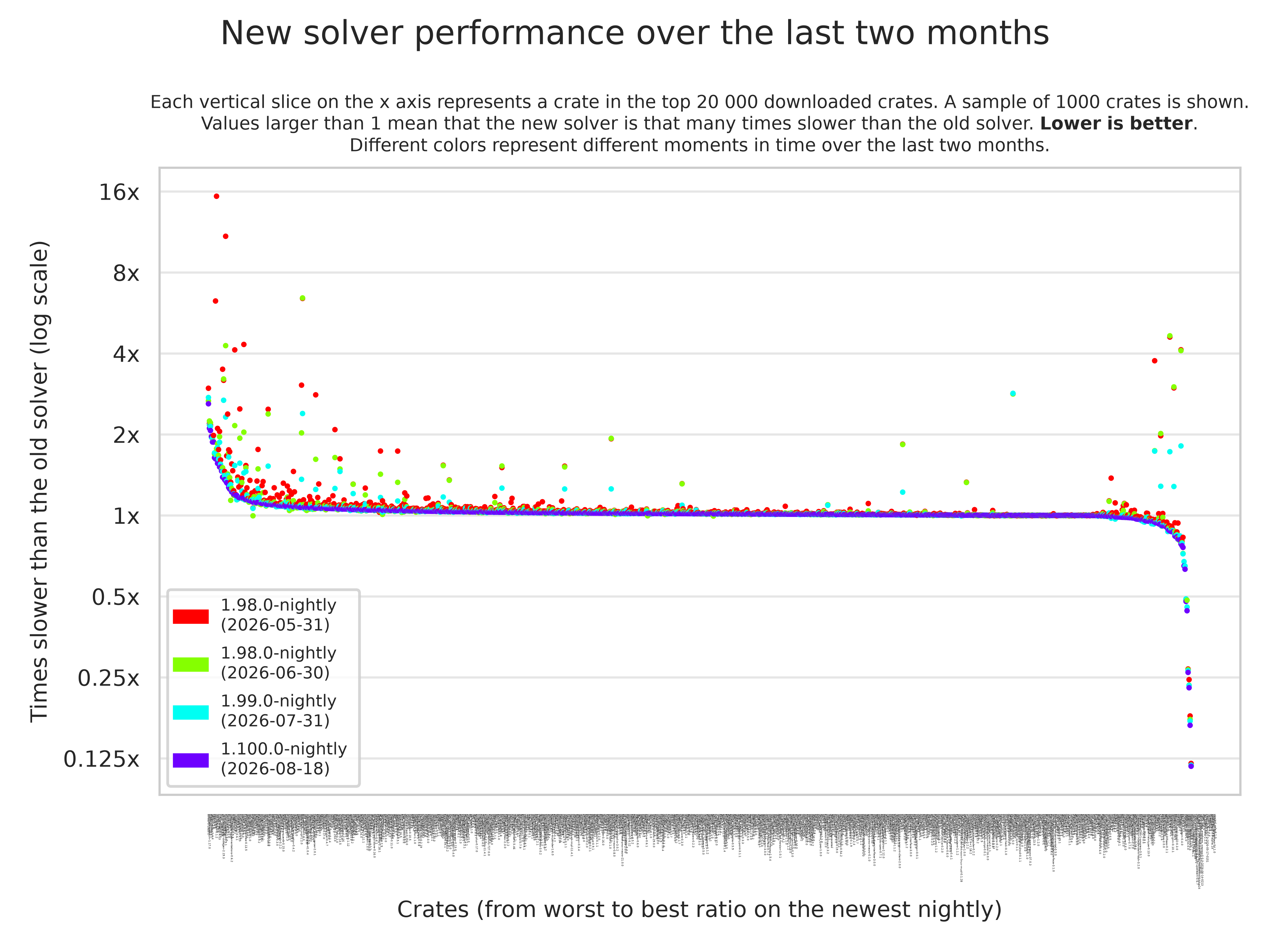
On the left and the right, the major outliers can be found. Note that the sample of crates here is biased towards such crates, because those are more interesting to us. Nearly all crates we tested in the top 20k had effectively the same performance with both implementations.
This graph shows that we've mainly focused our efforts on the negative outliers and made significant progress there. While many of the crates that previously took more than twice as long to compile with the new solver are still slightly slower, our work has made a few of them actually compile faster than with the old solver.
We will continue to improve its performance over the coming months, and there are still a lot of optimization opportunities compared to the existing implementation. My expectation is that, in the long term, nearly all crates will benefit from the next-generation trait solver. I am especially excited about the huge performance benefits for some trait-heavy crates.
As an example, a Chess implementation in Rust's type system hangs with the old implementation while taking a minute with the new one. There are also more practical crates with huge performance benefits, e.g., the datafusion crate compiles more than 8x faster now. For more details about the recent performance work, see this blog post by jana.
Again, thank you for testing with the latest nightly and opening a GitHub issue if you encounter any issues! We're excited to fully stabilize the next-generation trait solver soon.
Tom Ritter: webaudio fingerprinting on alibaba
There's a popular post going around about Alibaba doing WebAudio fingerprinting and in the process, mucking around with the author's Bluetooth headphones. Here's the tl;dr: browser fingerprinting is a far-too-pervasive method of tracking users across the web, but at least for WebAudio specifically, it's not very effective. Firefox has largely eliminated this fingerprinting vector.
I work on Firefox. Chrome, Brave, Safari probably have defenses against this. I'm pretty sure Chrome's WebAudio code was made approximately constant (like ours) many years ago. It probably still leaks CPU architecture though.
I don't fully agree with the adage "given enough eyeballs, all bugs are shallow" - I think a more true one might be "given enough victims, your attack code is going to change something that makes someone notice". And that's exactly what happened with... sorry, wrong link. That's exactly what happened with Alibaba's fingerprinting code.
If you want to test Alibaba's WebAudio fingerprint, I had claude extract it into a standalone page. My value is sha256:9a388c0dd04cfdc54314f9d961c7e2d247b972067e28d1cea76bd6060cf1392e, and the other value we saw in an internal survey was sha256:16d3191880ce01f726015ec6a1f9a072a81ebd04bf489098d4685d1d1c0b2711.
WebAudio Fingerprinting in FirefoxWe made the WebAudio constant in Firefox 118 as part of our initial round of Fingerprinting Protection features. This eliminated most of the differences.
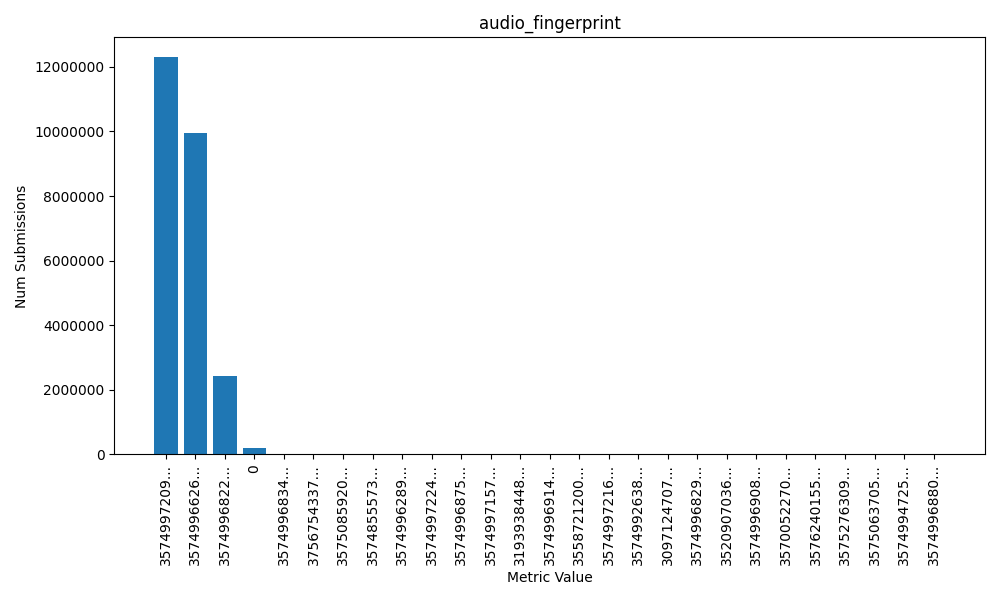
99.24% of users belong to one of three values, and .76% of users had that data collection point fail (a value of zero.) So virtually all users have one of these three values but why are there three values??? Why isn't there one?? Well this is why we collected this telemetry - to ensure we really had made things constant the way we thought we had, and if we hadn't, figure out why and fix it.
The improvements we put into 118 eliminated a lot of differences and I wish I had a graph I could show you of what it looked like before (but I don't.) But what about these remaining three buckets? We were able to figure out that the differences between these are CPU-level differences, which is not surprising given the math operations of audio processing. Specifically one value comes from (all) x86 CPUs and x64 CPUs that lack fused multiply-add instructions, one value from x64 with FMA, and one value from CPUs with the NEON instruction set (ARM).
We followed up on that effort to collapse these buckets into one another. Bug 2036977 collapses the x64 (with FMA3) into the x86/x64 (without FMA3) bucket. Bug 2040494 is on file to collapse the remaining bucket into the NEON bucket but I haven't worked on it in a while because it's just not as high a priority as larger improvements we can make like Sanitizing the WebGL Renderer and Vendor (something I talked a bit about a few months ago).
Because if you've read this far you surely care about the rest of the graph also. There is also the long-tail of 23 other values belonging to 48 other users. This is very unfortunate, as it makes these users completely unique, but it is also not terribly unusual - computers are weird and these results could have been caused by bad RAM, a CPU bug, or possibly some crazy architecture (LoongArch??).
But at the end of the day, WebAudio fingerprinting is nearly useless. I don't expect browser fingerprinting to disappear from websites entirely (unless some regulatory action occurs, fingers crossed) - it's still going to be effective against a majority of users on the web, but at least for privacy focused browsers, it should be wildly less effective.
The Mozilla Blog: A New Framework for Open Source AI
Open or closed AI isn’t a fringe question anymore; it’s a live policy debate, with real consequences for who gets to build, audit, and compete in the AI ecosystem. But as that debate plays out in Washington, Brussels, and beyond, the harder questions are still very much up for discussion. What does meaningful openness actually require? Where should the guardrails sit? And who gets a say in setting them?
That’s exactly the gap a group of us set out to close two years ago.
Back in 2024, Mozilla and the Columbia Institute of Global Politics brought together more than 40 researchers, builders, and policy experts for the Columbia Convening on Openness and AI. The goal was simple to state, but hard to do: figure out what “open” actually means once you’re talking about foundational models rather than traditional software, and build a shared vocabulary that researchers, developers, policymakers, and civil society could all work from.
The convening was the start of a years-long effort to turn a room full of perspectives on openness into something durable and useful for developers, builders, and policymakers alike. Recently, that effort reached a new milestone: Communications of the ACM published “Unpacking Open Source AI: Toward a Framework for Openness in Foundation Models,” which I co-authored alongside a host of other allies spanning academia, industry, and civil society.
The paper outlines a framework that does something the open source AI debate badly needs. It stops treating “open” as a single switch you flip on or off. Instead, it breaks the AI stack down into its component parts – data, code, model weights, documentation, and more – and looks at how openness at each layer shapes who actually gets to inspect, use, and build on a system. That kind of specificity matters. A lot of the current policy debate treats open source AI as a monolith, when in reality the details of what gets shared (and how) are what determine whether openness delivers on its promise of safety, competition, and accountability.
A few of the framework’s ideas are worth pulling out. First, it treats openness as a gradient rather than a binary. A system can be open on weights while remaining closed on training data, or open on code while offering little documentation on how it was evaluated. The framework offers language to describe that mix precisely, instead of lumping it under one vague label. Second, it argues that safety can’t be assessed at the model level alone: what matters just as much is the surrounding system – the deployment environment, the safeguards, the moderation layers, and governance structures. That’s because a model’s real-world risk profile is shaped by all of it together, not by the weights in isolation. Critically, the framework deliberately stops short of prescribing one “correct” level of openness for every system. Instead, it gives developers, researchers, and regulators a common vocabulary to make and evaluate those tradeoffs on a case-by-case basis.
It’s worth pausing on who’s behind this work. Scroll through the author list, and you’ll find a genuine cross-section of the individuals and organizations contributing to moving the development of open systems forward. It’s a collection of people who’ve spent years arguing, in good faith and often across real disagreements, that open approaches can be a foundation for safer, more democratic, more accountable AI. That’s the same spirit that drove the original convening, and it’s what makes this paper a genuinely important milestone for our mission to make AI systems accessible to the many, rather than the few.
You can read the full paper here.
The post A New Framework for Open Source AI appeared first on The Mozilla Blog.
Firefox Add-on Reviews: Extension starter pack
You’ve probably heard about “ad blockers,” “tab managers,” “anti-trackers” or any number of browser customization tools commonly known as extensions. And maybe you’re intrigued to try one, but you’ve never installed an extension before and the whole notion just seems a bit vague.
Let’s demystify extensions.
An extension is simply an app that runs on a browser like Firefox. From serious productivity and privacy enhancing features to fun stuff like changing the way the web looks and feels, extensions give you the power to completely personalize your browsing experience.
Addons.mozilla.org (AMO) is a discovery site that hosts thousands of independently developed Firefox extensions. It’s a vast and eclectic ecosystem of features, so we’ve hand-picked a small collection of great extensions to get you started…
I’ve always wanted an ad blocker! uBlock OriginWorks beautifully “right out of the box.” Just add it to Firefox and uBlock Origin will automatically start blocking all types of advertising — display ads, banners, video pre-rolls, pop-ups — you name it.
Of course, if you prefer deeper content blocking customization, uBlock Origin allows for fine control as well, like the ability to import your own custom block filters or access a data display that shows how much of a web page was blocked by the extension. More than just an ad blocker, uBlock Origin also effectively thwarts some websites that may be infected with malware.
For more insights about this excellent ad blocker, please see uBlock Origin — everything you need to know about the ad blocker, or to explore even more ad blocker options, check out What’s the best ad blocker for you?
I’m concerned about my privacy and tracking around the web Privacy BadgerThe flagship anti-tracking extension from privacy proponents at the Electronic Frontier Foundation, Privacy Badger is programmed to look for tracking heuristics (i.e. specific actions that indicate someone is trying to track you).
Zero set up required. Just install Privacy Badger and it will automatically search for third-party cookies, HTML5 local storage “supercookies,” canvas fingerprinting, and other sneaky tracking methods.
Consent-O-MaticNot only will Consent-O-Matic automatically handle pop-up data consent forms (per GDPR regulations), but it’s brilliantly designed to interpret the often intentionally confusing language of consent pop-ups trying to trick you into agreeing to invasive tracking.
Developed by internet privacy researchers at Aarhus University in Denmark who grew sick of seeing so many deceptive consent pop-ups, Consent-O-Matic’s decision-making logic is built upon studying hundreds of pop-ups and identifying duplicitous patterns. So using this extension not only gives you a great ally in the fight against intrusive tracking, but you’re spared the annoyance of constantly clicking consent forms all over the internet.
I need an easier way to translate languages Simple TranslateDo you do a lot of language translations on the web? If so, it’s a hassle always copying text and navigating away from the page you’re on just to translate a word or phrase. Simple Translate solves this problem by giving you the power to perform translations right there on the page.
Just highlight the text you want translated and right-click to get instant translations in a handy pop-up display, so you never have to leave the page again.
YouTube your way Enhancer for YouTubeDespite offering dozens of creative customization features, Enhancer for YouTube is easy to grasp and gives you a variety of ways to radically alter YouTube functionality.
Once the extension is installed you’ll find an additional set of controls just beneath YouTube’s video player (you can even select the extension features you want to appear in the control bar).
Key features include…
- Customize video player size
- Change YouTube’s look with a dark theme
- Volume boost
- Ad blocking (with ability to allow ads from channels you choose to support)
- One-click screenshots
- Change playback speed
- High-def default video quality
You’ve got an overwhelming number of open tabs. You can’t close them. You need them. But you can’t organize them all right now either. You’re too busy. What to do?!
If you have OneTab on Firefox you just click the toolbar button and suddenly all those open tabs become a clean list of text links listed on a single page. Ahhh serenity.
Not only will you create browser breathing room for yourself, but with all those previously open tabs now closed and converted to text links, you’ve also freed up a bunch of CPU and memory, which should improve browser speed and performance.
If you’ve never installed a browser extension before, we hope you found something here that piques your interest to try. To continue exploring ways to personalize Firefox through the power of extensions, please see our collection of 100+ Recommended Extensions.
Firefox Add-on Reviews: YouTube your way — browser extensions put you in charge of your video experience
YouTube wants you to experience YouTube in prescribed ways. But with the right browser extension, you’re free to alter YouTube to taste. Change the way the site looks, behaves, and delivers your favorite videos.
Enhancer for YouTubeWith dozens of customization features, Enhancer for YouTube has the power to dramatically reorient the way you watch videos.
While a bunch of customization options may seem overwhelming, Enhancer for YouTube actually makes it very simple to navigate settings and select just your favorite features. You can even choose which of your preferred features will display in the extension’s easy access interface that appears just beneath the video player.
Key features…
- Customize video player size
- Change YouTube’s look with a dark theme
- Volume booster
- Ad blocking (with ability to whitelist channels you OK for ads)
- Take quick screenshots of videos
- Change playback speed
- Set default video quality from low to high def
- Shortcut configuration
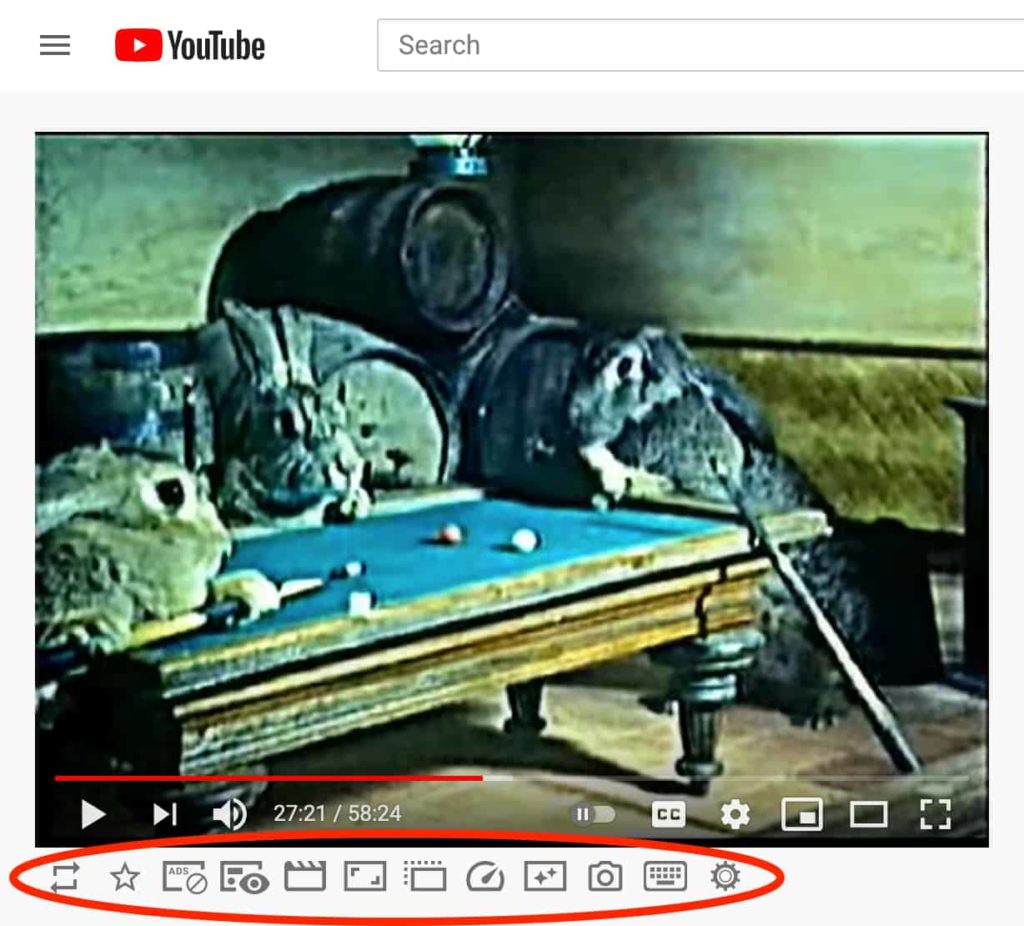 Enhancer for YouTube provides feature controls just beneath the video player.
Return YouTube Dislike
Enhancer for YouTube provides feature controls just beneath the video player.
Return YouTube Dislike
Do you like the Dislike? YouTube removed the display that reveals the number of thumbs-down Dislikes a video has, but with Return YouTube Dislike you can bring back the brutal truth.
“Does exactly what the name suggests. Can’t see myself without this extension. Seriously, bad move on YouTube for removing such a vital tool.”
Firefox user OFG“i have never smashed 5 stars faster.”
Firefox user 12918016 YouTube High DefinitionThough its primary function is to automatically play all YouTube videos in their highest possible resolution, YouTube High Definition has a few other fine features to offer.
In addition to automatic HD, YouTube High Definition can…
- Customize video player size
- HD support for clips embedded on external sites
- Specify your ideal resolution (4k – 144p)
- Set a preferred volume level
- Also automatically plays the highest quality audio
So simple. So awesome. YouTube NonStop remedies the headache of interrupting your music with that awful “Video paused. Continue watching?” message.
Works on YouTube and YouTube Music. Now you’re free to navigate away from the YouTube tab for as long as you like and never worry about music interruption again.
YouTube Screenshot ButtonIf you take a lot of screenshots on YouTube, then the aptly titled YouTube Screenshot Button is worth your time.
You’ll find a “Screenshot” button conveniently located on the control panel of videos, or at the top of the screen on Shorts (or you can use custom keystrokes), so it’s always easy to snap a quick shot. Set preferences to automatically download screenshots as JPEG or PNG files.
Unhook: Remove YouTube Recommended Videos & CommentsInstant serenity for YouTube! Unhook strips away unwanted distractions like the promotional sidebar, end-screen suggestions, trending tab, and much more.
More than two dozen customization options make this an essential extension for anyone seeking escape from YouTube rabbit holes. You can even hide notifications and live chat boxes.
“This is the best extension to control YouTube usage, and not let YouTube control you.”
Firefox user Shubham Mandiya PocketTubeIf you subscribe to a lot of YouTube channels PocketTube is a fantastic way to organize all your subscriptions by themed collections.
Group your channel collections by subject, like “Sports,” “Cooking,” “Cat videos,” etc. Other key features include…
- Add custom icons to easily identify channel collections
- Customize your feed so you just see videos you haven’t watched yet and prioritize videos from certain channels
- Integrates seamlessly with YouTube homepage
- Sync collections across Firefox/Android/iOS using Google Drive and Chrome Profiler
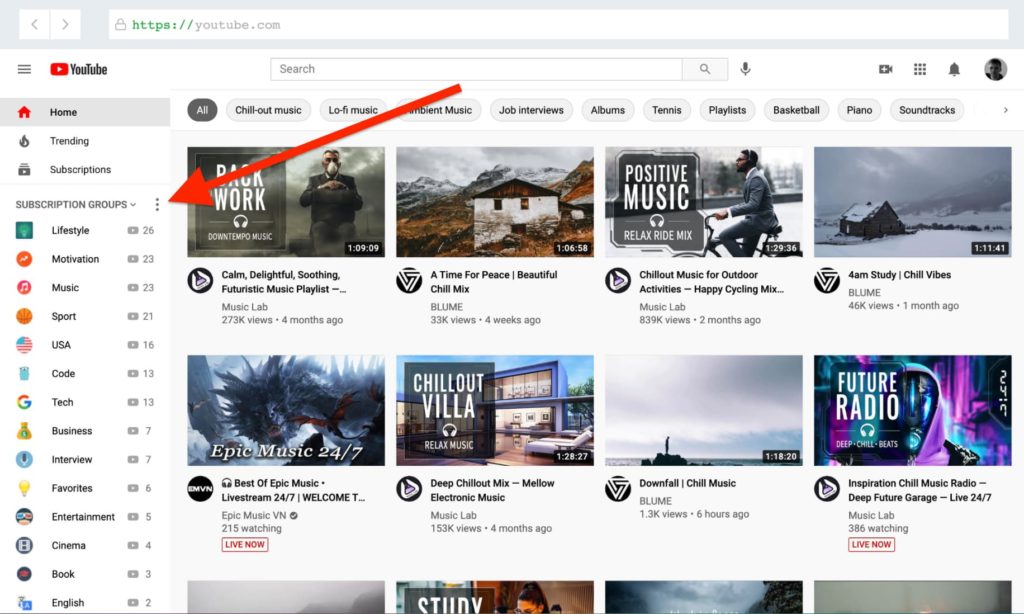 PocketTube keeps your channel collections neatly tucked away to the side.
AdBlocker for YouTube
PocketTube keeps your channel collections neatly tucked away to the side.
AdBlocker for YouTube
It’s not just you who’s noticed a lot more ads lately. Regain control with AdBlocker for YouTube.
The extension very simply and effectively removes both video and display ads from YouTube. Period. Enjoy a faster, more focused YouTube.
SponsorBlockIt’s a terrible experience when you’re enjoying a video or music on YouTube and you’re suddenly interrupted by a blaring ad. SponsorBlock solves this problem in a highly effective and original way.
Leveraging the power of crowd sourced information to locate where — precisely — interruptive sponsored segments appear in videos, SponsorBlock learns where to automatically skip sponsored segments with its ever growing database of videos. You can also participate in the project by reporting sponsored segments whenever you encounter them (it’s easy to report right there on the video page with the extension).
SponsorBlock can also learn to skip non-music portions of music videos and intros/outros, as well. If you’d like a deeper dive of SponsorBlock we profiled its developer and open source project on Mozilla Distilled.
We hope one of these extensions enhances the way you enjoy YouTube. Feel free to explore more great media extensions on addons.mozilla.org.
The Rust Programming Language Blog: Supply chain attack on arrayref
On 2026-08-20 at 7:15 UTC we got a report that the proc-macro1 crate was malicious.
The Rust Security Response Team verified this to be the case: the crate had a build script that was downloading a malicious payload.
This crate proc-macro1 and others like it (proc-macro-en, aovine, arone, aronenao, tinymember) have been deleted.
Furthermore, we discovered that the popular arrayref crate had recently been republished and made to depend on this crate, with the most recent versions yanked. We have removed the malicious version and unyanked the maliciously-yanked versions. Other crates by that author (internment, append-only-vec) were also affected so we have done the same for those, and locked the account as a precaution. We do not believe the author of arrayref to be acting maliciously, but their computer or credentials are likely compromised, and we are attempting to contact them.
What you need to doWe recommend you check your local dependencies to ensure these crates were not pulled in. Here are the malicious versions that we deleted from crates.io:
- append-only-vec@0.1.9: published at 2026-08-20T07:37:49Z, deleted at 2026-08-20T09:25:24Z. Online for 107 minutes.
- arrayref@0.3.10: published at 2026-08-20T07:15:00Z, deleted at 2026-08-20T08:41:40Z. Online for 86 minutes.
- internment@0.8.7: published at 2026-08-20T07:34:07Z, deleted at 2026-08-20T09:04:11Z. Online for 90 minutes.
- proc-macro1, proc-macro-en, aovine, arone, aronenao, tinymember (any versions).
You can quickly check if these crates have been used locally by going through ~/.cargo/registry/cache with this command:
find ~/.cargo/registry/cache -type f \( \ -name 'append-only-vec-0.1.9.crate' -o \ -name 'arrayref-0.3.10.crate' -o \ -name 'internment-0.8.7.crate' -o \ -name 'proc-macro1-*.crate' -o \ -name 'proc-macro-en-*.crate' -o \ -name 'aovine-*.crate' -o \ -name 'arone-*.crate' -o \ -name 'aronenao-*.crate' -o \ -name 'tinymember-*.crate' \ \) -print ThanksWe'd like to thank the Research Team at Nextron Systems GmbH for initially discovering this and reporting it to us. We'd also like to thank Emily Albini, Manish Goregaokar, Marco Ieni, Tobias Bieniek, Ubiratan Soares, and Walter Pearce for participating in the response here.
The Rust Programming Language Blog: Announcing Rust 1.98.0
The Rust team is happy to announce a new version of Rust, 1.98.0. Rust is a programming language empowering everyone to build reliable and efficient software.
If you have a previous version of Rust installed via rustup, you can get 1.98.0 with:
$ rustup update stableIf you don't have it already, you can get rustup from the appropriate page on our website, and check out the detailed release notes for 1.98.0.
If you'd like to help us out by testing future releases, you might consider updating locally to use the beta channel (rustup default beta) or the nightly channel (rustup default nightly). Please report any bugs you might come across!
What's in 1.98.0 stable Algebraic floating-point methodsThe floating-point types f32 and f64 now have "algebraic" methods for addition, subtraction, multiplication, division, and remainder. These allow optimizations on these operations using the algebraic properties of real numbers, even though these properties do not hold with the limitations of floating-point representations. The exact set of optimizations is not specified, but may be similar to the kind of optimization you would see with the -ffast-math option in other languages.
For example, floating-point addition is not associative, so a sum like a + b + c + d must be evaluated in the left-associative order in which it is parsed, like ((a + b) + c) + d. If you write the same sum as a chain of algebraic_add calls, then the compiler is free to reorder it, perhaps like (a + b) + (c + d) to evaluate the partial sums simultaneously. Broader loop-vectorization is often enabled by using these algebraic methods as well.
These methods are non-deterministic, since the compiler is free to choose different optimizations, but they never cause undefined behavior. See the library documentation and the original API change proposal for more details.
Buffered integer formattingAll of the primitive integer types now have a format_into method that takes a &mut NumBuffer<Self> parameter, which is a buffer that is large enough to hold the decimal format of any value of that type. The buffer itself is opaque, but the method returns the formatted &str with a lifetime borrowed from that buffer.
This method also bypasses much of the dynamic dispatch that you would get with buffered write! formatting, which can be a boon to performance. The itoa-benchmark repo now shows that format_into performs similarly to itoa itself, so this could serve as a standard replacement for that dependency and others like it.
Fix interaction between ManuallyDrop and BoxPrior to Rust 1.96.0, there was a bug in the Rust compiler, which made the following code undefined behavior:
let mut x = ManuallyDrop::new(Box::new(1)); unsafe { ManuallyDrop::drop(&mut x) }; let x = x; // UB!This is because the compiler considers it undefined behavior to move a Box that has been dropped (deallocated), and ManuallyDrop used to propagate that, such that moving ManuallyDrop<Box<_>> where the box has been dropped would also be considered UB.
In Rust 1.96.0 we fixed this, so this code was no longer UB. In this release we have updated the ManuallyDrop documentation, providing a stable guarantee that this code will continue to not be UB in the future. See ManuallyDrop docs and the related RFC 3336 for more information.
Stabilized APIs- str::substr_range
- [T]::subslice_range
- core::fmt::NumBuffer
- <{integer}>::format_into
- Send/Sync for std::process::CommandArgs
- {fN}::algebraic_add
- {fN}::algebraic_sub
- {fN}::algebraic_mul
- {fN}::algebraic_div
- {fN}::algebraic_rem
- NonZero<{integer}>::from_str_radix
- String::from_utf16le
- String::from_utf16le_lossy
- String::from_utf16be
- String::from_utf16be_lossy
- [T]::strip_circumfix
- str::strip_circumfix
- Atomic<T>::from_mut
- Atomic<T>::get_mut_slice
- Atomic<T>::from_mut_slice
- std::range::legacy
Check out everything that changed in Rust, Cargo, and Clippy.
Contributors to 1.98.0Many people came together to create Rust 1.98.0. We couldn't have done it without all of you. Thanks!
Support.Mozilla.Org: Firefox new release cadence and what to expect
Some of you may have heard about this change from the announcement the team shared in early July, but Firefox is moving to a two-week release cycle. The first release on the new cadence is Firefox 155 on September 1, 2026, two weeks earlier than the originally planned September 15 release.
Why this is happeningIf you’ve been following recent Firefox releases, you may have noticed that we’ve shipped multiple dot releases for several versions (up to six for Firefox 152). This new release cadence is designed to get bug fixes and completed features into users’ hands sooner, while making the release process more predictable.
It’s important to note that this doesn’t mean Firefox will ship twice as many features. Instead, we’ll be releasing updates more frequently, using a two-week rhythm instead of the current four-week cadence. For contributors, the biggest benefit is predictability: rather than waiting for an unpredictable series of dot releases, we’ll have a more consistent release schedule to plan around.
That said, it doesn’t mean dot releases will disappear entirely. They may still happen when needed, albeit not as often.
Here’s what to expect, how we’re preparing, and how you can help.
What it means for SUMOCommunity Forum
On a typical Firefox release, we see an average of 30% increase in incoming support questions during the first 10 days. Under the new two-week release cadence, we expect these waves of questions will arrive more frequently.
The good news is that we’ve observed a consistent pattern after each release. Most questions fall into a handful of common categories, including UI changes (“Where did this go?”), lost data after updating, and crashes. We expect to see the same types of questions, just on a more frequent schedule, which gives us an opportunity to prepare ahead of each release.
Knowledge Base & Localization
A faster release cadence also means a faster content cycle. We expect that content requests will arrive on a more distributed timeline instead of every 4 weeks. But of course, this will also have a downstream impact on localization, as new and updated KB articles become available for translation more frequently. We recognize the additional pressure this could put on localization communities, and we’ll be monitoring the transition closely to make sure we’re mindful of contributor capacity.
Release preparation
We’ll be preparing a release wiki page every two weeks instead of every four. For now, our monthly Community Call will remain on its existing monthly schedule, though we’ll revisit that if the new release cadence creates a need for more frequent community updates.
How we’re preparing and how you can helpHere’s what we’re doing:
- Community Forum: We’ll be adding and updating canned responses related to the most common post-release questions, including UI changes, lost data after updating, crashes, and other recurring issues. We’ll also continue to prepare the release wiki before each Firefox release so you’ll know what’s changing and what to expect.
- Knowledge Base: The CX team is updating the Bugzilla content request template and collaborating with the product folks to make it easier for them to submit content requests and provide the information needed to create the content. We’ve also introduced a sumo-contributors keyword in Bugzilla to categorize requests that are open for contributors, making them easier to find and track.
- Localization: We know the SUMO localization dashboard doesn’t currently have a priority indicator, so please use the release wiki as a guide to identify which content may need attention first. We’ll also explore ways to provide better visibility into upcoming content changes, giving localization communities more time to plan their work around the new release cadence.
Here’s how you can help:
- Be extra active during the first 10 days after each release. That’s when we see the biggest wave of support questions, and your contributions have the greatest impact.
- Use our common forum responses. They’ll help you reply more quickly and consistently. If you spot opportunities for improvement, please let us know in this thread! Your feedback will help make them even better for future releases.
- Get involved in the KB content request process. With content requests arriving more frequently, we’ll need more contributor participation to help create, update, and review support content. Keep an eye on Bugzilla requests tagged with sumo-contributors for opportunities to get involved.
- Keep an eye on the release calendar for localization work. Localization work will likely arrive on a more distributed schedule rather than being concentrated every four weeks. Following the release calendar can help you anticipate when new or updated content may be ready for localization. But of course, be sure to contribute at a pace that works for you.
We also want to acknowledge that contributor burnout is a real risk when the quieter periods between releases become shorter. We’ll be monitoring the transition closely and adjusting as we learn. Most importantly, you should never feel like you have to be “on” all the time. Every contribution, no matter how big or small, makes a difference.
The first major test of this new cadence will likely come with Firefox 157, when Project Nova is expected to roll out more broadly. We’ll treat that release as an opportunity to learn what works, identify where we need to improve, and fine-tune our approach together.
Thank you for everything you do to support Firefox users. This transition is only possible because of our contributor community. If you have any questions, concerns, or ideas, we’d love to hear them. Join our Community Call where we’ll also discuss more about this change.
Firefox Tooling Announcements: MozPhab 2.17.0 Released
Bugs resolved in Moz-Phab 2.17.0:
- bug 2036748 submit: parallelise per-commit upload + creatediff across the stack
- bug 2036749 git: skip restoring git checkout in cleanup/finalize when HEAD already on branch
- bug 2060484 " Phabricator Error: Validation errors" should display the revision
Discuss these changes in #engineering-workflow on Slack or #Conduit Matrix.
1 post - 1 participant
Mozilla Privacy Blog: Brasil dá um passo importante para a promoção de mercados digitais abertos e competitivos
Leia a versão em inglês aqui.
A concorrência é o ponto forte da internet. Com a possibilidade de as pessoas escolherem navegadores, mecanismos de pesquisa e aplicativos livremente, a concorrência entre das empresas se baseia no mérito. No entanto, os mercados digitais estão concentrados em “guardiões” que controlam a descoberta, dificultando o alcance de usuários por desenvolvedores independentes. A fiscalização tradicional acabou se tornando ineficaz, normalmente sendo muito tardia. Agora, governos do mundo todo estão adotando novas ferramentas para garantir um mercado aberto e contestável.
O projeto de lei (PL) 4675/2025 é um passo importante nessa direção. Baseando-se na DMA (Digital Markets Act) da União Europeia e na DMCCA (Digital Markets, Competition and Consumers Act) do Reino Unido, esse projeto de lei aborda questões de concorrência sistêmica voltadas à realidade do mercado brasileiro. A Mozilla é a favor dessa legislação, que visa criar uma estrutura segmentada de concorrência para os mercados digitais brasileiros.
A concorrência possibilita produtos melhores e liberdade de escolha
Há vinte anos, a Mozilla desenvolve o Firefox como um navegador independente, priorizando a privacidade, a segurança e a escolha. Operamos no Gecko, um dos três mecanismos de navegador existentes no mundo. A independência é essencial para evitar dominância no mercado e garantir que os usuários tenham liberdade de escolha. A inovação não é suficiente. Os produtos precisam de oportunidades justas de concorrência sem barreiras de pré-instalação ou interoperabilidade.
O PL 4675/2025 trata dessa questão por meio de uma estrutura ex ante, permitindo que a autoridade relevante mitigue os riscos antes de se tornarem irreversíveis. O anteprojeto mais recente contém melhorias importantes dessa estrutura. Ele determina as obrigações de acordo com produtos ou serviços específicos, em vez de aplicá-las automaticamente a todo um grupo corporativo; define proteções processuais durante todo o processo de designação; e traça limites mais claros sobre a capacidade da autoridade de fazer algo as obrigações além daquelas estabelecidas na legislação. De forma mais notável, ele determina uma arquitetura de escolha “isonômica e não discriminatória”, incluindo telas de opções para selecionar, instalar ou definir produtos de terceiros como padrão.
A experiência da Mozilla com telas de escolha de navegador, em conformidade com a DMA da União Europeia, mostra que essas disposições funcionam. O Firefox foi o navegador de escolha mais de seis milhões de vezes. A probabilidade de as pessoas que escolheram o Firefox nessas telas continuarem usando o navegador é cinco vezes maior. Ao tornar a estrutura segmentada e previsível, o PL 4675/2025 estabelece a base para um ecossistema de concorrência em que a inovação impulsiona o sucesso.
Qual é o benefício da concorrência para as pessoas
A política de concorrência defende as pessoas. Mercados abertos permitem a liberdade de escolha e o sucesso de empresas menores. Críticos argumentam que essas propostas prejudicam a inovação, mas nossa experiência sugere o contrário. O Gecko, mecanismo de navegador do Firefox, continua sendo o maior mecanismo não controlado por uma operadora dominante de sistema operacional. Essa independência nos permite priorizar inovações voltadas aos usuários, como proteções avançadas de privacidade e segurança.
Decisões de design, como padrões pré-instalados e barreiras de interoperabilidade, moldam significativamente a experiência de usuários. A pesquisa Over the Edge 2.0 da Mozilla destaca como essas práticas afetam a liberdade de escolha. Startups também se beneficiam, pois podem alcançar usuários e concorrer com base no mérito, em vez de depender de decisões de plataformas dominantes. O projeto de lei brasileiro promove essas condições ao proporcionar ao Cade (Conselho Administrativo de Defesa Econômica) as ferramentas para tratar de práticas anticoncorrenciais, garantindo que a concorrência de plataformas dominantes ocorra por meio de melhoria da qualidade do produto, não por controle da infraestrutura.
De olho no futuro
Os mercados digitais evoluem, mas os princípios de concorrência justa (abertura, liberdade de escolha, interoperabilidade e transparência) continuam iguais. O PL 4675/2025 transforma esses princípios em normas aplicáveis. Seu modelo ex ante segmentado e suas proteções processuais posicionam o Brasil entre os países que visam restaurar o equilíbrio do mercado. Por fim, o sucesso da estrutura será medido por sua capacidade de proporcionar uma mudança significativa para os usuários.
A Mozilla é a favor desse projeto de lei e se dispõe a colaborar com o poder legislativo, o Cade e todas as partes interessadas. Com alterações segmentadas, o PL 4675/2025 pode se tornar uma estrutura duradoura a favor da concorrência, da inovação e da liberdade de escolha.
The post Brasil dá um passo importante para a promoção de mercados digitais abertos e competitivos appeared first on Open Policy & Advocacy.
Mozilla Privacy Blog: Brazil is Taking an Important Step Toward More Open & Competitive Digital Markets
Read the Portuguese version here.
Competition is a strength of the internet. When people freely choose among browsers, search engines, and apps, companies compete on merit. However, digital markets have concentrated around ‘gatekeepers’ that control discovery, making it harder for independent developers to reach users. Traditional enforcement has proven ineffective, often arriving too late. Governments worldwide are now adopting new tools to ensure open, contestable markets.
Brazil’s Bill 4,675/2025 is a critical step in this direction. Drawing lessons from the EU’s Digital Markets Act and the UK’s Digital Markets, Competition and Consumers regime, the bill addresses structural competition concerns with an approach calibrated to Brazil’s market realities. Mozilla strongly supports this legislation, which aims to establish a tailored competition framework for Brazil’s digital markets.
Competition unlocks better products and meaningful choice
For over twenty years, Mozilla has built Firefox as an independent browser prioritizing privacy, security, and choice. We operate on Gecko, one of only three browser engines worldwide. Maintaining independence is critical to preventing market dominance and ensuring users have genuine choices. Innovation alone isn’t enough; products need fair opportunities to compete without being hindered by preinstallation or interoperability barriers.
Bill 4,675 addresses this via an ex ante framework, allowing Brazil’s competition authority to mitigate risks before they become irreversible. The latest draft improves this framework in several important ways. It tailors obligations to specific products and services rather than automatically applying them across an entire corporate group, strengthens procedural safeguards throughout the designation process, and places clearer limits on the authority’s ability to expand obligations beyond those established in legislation. Most notably, it requires “neutral and non-discriminatory” choice architecture, including choice screens, for selecting, installing, or setting third-party products as defaults.
Mozilla’s experience with browser choice screens under the EU Digital Markets Act proves these provisions work. Firefox has been selected more than six million times, and users who select Firefox through these screens are five times more likely to continue using it. By making the framework targeted and predictable, Bill 4,675 establishes a foundation for a competitive ecosystem where innovation drives success.
How competition delivers for people
Competition policy is about people. Open markets provide genuine choice and allow smaller players to thrive. Critics argue these proposals harm innovation, but our experience suggests the opposite. Gecko, Firefox’s browser engine, remains the only major engine not controlled by a dominant OS operator. This independence enables us to prioritize user-focused innovations like advanced privacy and security protections.
Design decisions, like preinstalled defaults and interoperability barriers, significantly shape the user experience. Mozilla’s Over the Edge 2.0 research highlights how these practices undermine choice. Startups similarly benefit when they can reach users and compete on merit rather than relying on dominant platform decisions. Brazil’s bill can foster these conditions by providing CADE with tools to address anti-competitive practices, ensuring dominant platforms compete by improving product quality rather than leveraging infrastructure control.
Looking ahead
Digital markets evolve, but healthy competition principles (openness, choice, interoperability, and transparency) remain constant. Bill 4,675 translates these into enforceable rules. Its tailored ex ante model and procedural safeguards position Brazil among jurisdictions restoring market balance. Ultimately, the framework’s success will be measured by its ability to deliver meaningful change for users.
Mozilla supports this bill and looks forward to collaborating with lawmakers, CADE, and stakeholders. With targeted refinements, Bill 4,675 can become a durable framework that promotes competition, supports innovation, and empowers people with greater choice.
The post Brazil is Taking an Important Step Toward More Open & Competitive Digital Markets appeared first on Open Policy & Advocacy.